> ## Documentation Index
> Fetch the complete documentation index at: https://docs.synq.io/llms.txt
> Use this file to discover all available pages before exploring further.
# dbt Core
> Integrating dbt Core with Coalesce Quality
This guide shows you how to connect your dbt Core project to Coalesce Quality to track model runs, test results, and metadata changes.
**Prerequisites:**
* Admin access to your Coalesce Quality workspace
* Ability to modify your dbt orchestration tool (Airflow, GitHub Actions, etc.)
⏱️ **Estimated time:** 15 minutes
Using dbt Cloud? You can integrate directly through **Settings → Integrations → Add Integration → dbt Cloud** instead of following this guide.
# Set up dbt Core integration
## Create integration in Coalesce Quality
1. Navigate to **Settings → Integrations → Add Integration**
2. Select **dbt Core** from the integration options
### Configure integration settings
**Integration name:** Enter a descriptive name (e.g., `Production dbt Core`)
**Generate token:** Click **Create** to generate your integration token. You'll use this token with the `synq-dbt` tool to send artifacts securely to Coalesce Quality.
**Git integration:** Select your Git provider to link model changes to repository commits. This enables change tracking and lineage visualization.
**Relative path to dbt:** If your dbt project isn't in the repository root, specify the directory path (e.g., `analytics/dbt/`).
## Manage integration tokens
Access token management through **Settings → Integrations**, then select your dbt Core integration and click **Manage tokens**.
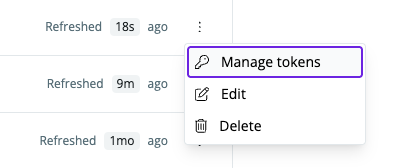 From the token management screen, you can:
* Create new tokens for different environments
* Invalidate compromised tokens
* Copy token snippets for easy integration
From the token management screen, you can:
* Create new tokens for different environments
* Invalidate compromised tokens
* Copy token snippets for easy integration
 # Install synq-dbt
## About synq-dbt
[`synq-dbt`](https://github.com/getsynq/synq-dbt) is a command-line wrapper that runs your existing dbt Core commands and automatically uploads artifacts to Coalesce Quality. It's version-agnostic — working with any dbt Core version by passing all arguments directly to your installed dbt — and integrates seamlessly with orchestration tools like Airflow, GitHub Actions, and Dagster.
**Collected artifacts:**
* `manifest.json` — Project structure and dependencies
* `run_results.json` — Execution status and performance metrics
* `catalog.json` — Complete data warehouse schema information
* `sources.json` — Source freshness test results
**How it works:**
1. Executes your locally installed dbt Core with all provided arguments (version-agnostic, passes arguments directly)
2. Captures the original dbt exit code
3. Reads your `SYNQ_TOKEN` environment variable
4. Uploads artifacts from the target directory to Coalesce Quality
5. Returns the original dbt Core exit code, even if upload fails (preserving pipeline behavior and ensuring CI/CD reliability)
## Installation methods
Choose the installation method that matches your dbt orchestration setup:
### Airflow with DockerOperator
1. **Set environment variable:** In Airflow UI, create a new environment variable `SYNQ_TOKEN` with your integration token.
2. **Update Dockerfile:**
```dockerfile theme={null}
ENV SYNQ_VERSION=v2.0.0
RUN wget -O /usr/bin/synq-dbt https://github.com/getsynq/synq-dbt/releases/download/${SYNQ_VERSION}/synq-dbt-amd64-linux && \
chmod +x /usr/bin/synq-dbt
```
3. **Update your operator:**
```python theme={null}
KubernetesPodOperator(
env_vars={
"SYNQ_TOKEN": Variable.get("SYNQ_TOKEN"),
# For US region: "SYNQ_API_ENDPOINT": "https://api.us.synq.io"
},
cmds=["synq-dbt"],
arguments=["build"], # Your dbt command here
# ... other configuration
)
```
**Linking dbt models to Airflow tasks:** To automatically link your dbt models with the Airflow tasks that execute them, see the [Airflow + dbt Core Linking guide](/orchestration-integrations/airflow-dbt-core). This enables bidirectional visibility between your orchestration and data layers.
### Airflow with dbt Plugin
1. **Set environment variable:** Create `SYNQ_TOKEN` in Airflow UI.
2. **Install synq-dbt:**
```shell theme={null}
export SYNQ_VERSION=v2.0.0
wget -O ./synq-dbt https://github.com/getsynq/synq-dbt/releases/download/${SYNQ_VERSION}/synq-dbt-amd64-linux
chmod +x ./synq-dbt && mv synq-dbt /usr/local/bin/synq-dbt
```
3. **Update DbtOperator:**
```python theme={null}
dbt_run = DbtRunOperator(
dbt_bin='synq-dbt',
env={
"SYNQ_TOKEN": Variable.get("SYNQ_TOKEN"),
# For US region: "SYNQ_API_ENDPOINT": "https://api.us.synq.io"
},
# ... other configuration
)
```
For linking dbt models to Airflow tasks, see the [Airflow + dbt Core Linking guide](/orchestration-integrations/airflow-dbt-core).
### Dagster
1. **Configure environment:** Add `SYNQ_TOKEN=` to your `.env` file. For US region workspaces, also add `SYNQ_API_ENDPOINT=https://api.us.synq.io`.
2. **Update resources in `definitions.py`:**
```python theme={null}
resources = {
"dbt": DbtCliResource(
dbt_executable='synq-dbt',
project_dir=os.fspath(dbt_project_dir)
),
}
```
3. **Update assets in `assets.py`:**
```python theme={null}
@dbt_assets(manifest=dbt_manifest_path)
def jaffle_shop_dbt_assets(context: AssetExecutionContext, dbt: DbtCliResource):
dbt_target_path = Path('target')
yield from dbt.cli(["build"], target_path=dbt_target_path, context=context).stream()
```
### Docker
Add to your Dockerfile:
```dockerfile theme={null}
ENV SYNQ_VERSION=v2.0.0
RUN wget -O /usr/bin/synq-dbt https://github.com/getsynq/synq-dbt/releases/download/${SYNQ_VERSION}/synq-dbt-amd64-linux && \
chmod +x /usr/bin/synq-dbt
```
### Linux/macOS
**Download and install:**
```shell theme={null}
# For Linux
export SYNQ_VERSION=v2.0.0
wget -O ./synq-dbt https://github.com/getsynq/synq-dbt/releases/download/${SYNQ_VERSION}/synq-dbt-amd64-linux
# For macOS
wget -O ./synq-dbt https://github.com/getsynq/synq-dbt/releases/download/${SYNQ_VERSION}/synq-dbt-arm64-darwin
# Make executable and move to PATH
chmod +x ./synq-dbt && mv synq-dbt /usr/local/bin/synq-dbt
# Set your token and test
export SYNQ_TOKEN=
synq-dbt --version
```
# Use synq-dbt
## Basic usage
Replace your existing dbt Core commands with `synq-dbt`:
```shell theme={null}
# Instead of: dbt run --select finance --threads 5
synq-dbt run --select finance --threads 5
# Instead of: dbt test --select reports
synq-dbt test --select reports
# Instead of: dbt build
synq-dbt build
```
All dbt Core arguments and options work exactly the same way.
## Upload existing artifacts
If you have already generated dbt artifacts and want to upload them to Coalesce Quality:
```shell theme={null}
export SYNQ_TOKEN=
synq-dbt synq_upload_artifacts
```
**Include dbt logs:**
```shell theme={null}
dbt build | tee dbt.log
synq-dbt synq_upload_artifacts --dbt-log-file dbt.log
```
## Configuration options
**Environment variables:**
* `SYNQ_TOKEN` — Your integration token (required)
* `SYNQ_TARGET_DIR` — Artifact directory path (default: `target/`)
* `SYNQ_API_ENDPOINT` — API endpoint for your region (required for US region)
**Regional configuration:**
EU region customers (default) don't need to set `SYNQ_API_ENDPOINT`. US region customers must configure it.
For **US region** workspaces, set the API endpoint:
```shell theme={null}
export SYNQ_API_ENDPOINT=https://api.us.synq.io
```
For **EU region** workspaces (default), no additional configuration needed — the tool automatically uses `https://developer.synq.io`.
**Network requirements:**
* Allow outbound HTTPS traffic to `developer.synq.io:443` (EU region) or `api.us.synq.io:443` (US region)
**Data visibility:**
* Artifacts appear in Coalesce Quality within minutes of upload under normal conditions
* Failed uploads are logged and can be retried
* Typical payload sizes range from several megabytes to tens of megabytes depending on project size
For advanced configuration options and troubleshooting, see the [synq-dbt GitHub repository](https://github.com/getsynq/synq-dbt).
# Install synq-dbt
## About synq-dbt
[`synq-dbt`](https://github.com/getsynq/synq-dbt) is a command-line wrapper that runs your existing dbt Core commands and automatically uploads artifacts to Coalesce Quality. It's version-agnostic — working with any dbt Core version by passing all arguments directly to your installed dbt — and integrates seamlessly with orchestration tools like Airflow, GitHub Actions, and Dagster.
**Collected artifacts:**
* `manifest.json` — Project structure and dependencies
* `run_results.json` — Execution status and performance metrics
* `catalog.json` — Complete data warehouse schema information
* `sources.json` — Source freshness test results
**How it works:**
1. Executes your locally installed dbt Core with all provided arguments (version-agnostic, passes arguments directly)
2. Captures the original dbt exit code
3. Reads your `SYNQ_TOKEN` environment variable
4. Uploads artifacts from the target directory to Coalesce Quality
5. Returns the original dbt Core exit code, even if upload fails (preserving pipeline behavior and ensuring CI/CD reliability)
## Installation methods
Choose the installation method that matches your dbt orchestration setup:
### Airflow with DockerOperator
1. **Set environment variable:** In Airflow UI, create a new environment variable `SYNQ_TOKEN` with your integration token.
2. **Update Dockerfile:**
```dockerfile theme={null}
ENV SYNQ_VERSION=v2.0.0
RUN wget -O /usr/bin/synq-dbt https://github.com/getsynq/synq-dbt/releases/download/${SYNQ_VERSION}/synq-dbt-amd64-linux && \
chmod +x /usr/bin/synq-dbt
```
3. **Update your operator:**
```python theme={null}
KubernetesPodOperator(
env_vars={
"SYNQ_TOKEN": Variable.get("SYNQ_TOKEN"),
# For US region: "SYNQ_API_ENDPOINT": "https://api.us.synq.io"
},
cmds=["synq-dbt"],
arguments=["build"], # Your dbt command here
# ... other configuration
)
```
**Linking dbt models to Airflow tasks:** To automatically link your dbt models with the Airflow tasks that execute them, see the [Airflow + dbt Core Linking guide](/orchestration-integrations/airflow-dbt-core). This enables bidirectional visibility between your orchestration and data layers.
### Airflow with dbt Plugin
1. **Set environment variable:** Create `SYNQ_TOKEN` in Airflow UI.
2. **Install synq-dbt:**
```shell theme={null}
export SYNQ_VERSION=v2.0.0
wget -O ./synq-dbt https://github.com/getsynq/synq-dbt/releases/download/${SYNQ_VERSION}/synq-dbt-amd64-linux
chmod +x ./synq-dbt && mv synq-dbt /usr/local/bin/synq-dbt
```
3. **Update DbtOperator:**
```python theme={null}
dbt_run = DbtRunOperator(
dbt_bin='synq-dbt',
env={
"SYNQ_TOKEN": Variable.get("SYNQ_TOKEN"),
# For US region: "SYNQ_API_ENDPOINT": "https://api.us.synq.io"
},
# ... other configuration
)
```
For linking dbt models to Airflow tasks, see the [Airflow + dbt Core Linking guide](/orchestration-integrations/airflow-dbt-core).
### Dagster
1. **Configure environment:** Add `SYNQ_TOKEN=` to your `.env` file. For US region workspaces, also add `SYNQ_API_ENDPOINT=https://api.us.synq.io`.
2. **Update resources in `definitions.py`:**
```python theme={null}
resources = {
"dbt": DbtCliResource(
dbt_executable='synq-dbt',
project_dir=os.fspath(dbt_project_dir)
),
}
```
3. **Update assets in `assets.py`:**
```python theme={null}
@dbt_assets(manifest=dbt_manifest_path)
def jaffle_shop_dbt_assets(context: AssetExecutionContext, dbt: DbtCliResource):
dbt_target_path = Path('target')
yield from dbt.cli(["build"], target_path=dbt_target_path, context=context).stream()
```
### Docker
Add to your Dockerfile:
```dockerfile theme={null}
ENV SYNQ_VERSION=v2.0.0
RUN wget -O /usr/bin/synq-dbt https://github.com/getsynq/synq-dbt/releases/download/${SYNQ_VERSION}/synq-dbt-amd64-linux && \
chmod +x /usr/bin/synq-dbt
```
### Linux/macOS
**Download and install:**
```shell theme={null}
# For Linux
export SYNQ_VERSION=v2.0.0
wget -O ./synq-dbt https://github.com/getsynq/synq-dbt/releases/download/${SYNQ_VERSION}/synq-dbt-amd64-linux
# For macOS
wget -O ./synq-dbt https://github.com/getsynq/synq-dbt/releases/download/${SYNQ_VERSION}/synq-dbt-arm64-darwin
# Make executable and move to PATH
chmod +x ./synq-dbt && mv synq-dbt /usr/local/bin/synq-dbt
# Set your token and test
export SYNQ_TOKEN=
synq-dbt --version
```
# Use synq-dbt
## Basic usage
Replace your existing dbt Core commands with `synq-dbt`:
```shell theme={null}
# Instead of: dbt run --select finance --threads 5
synq-dbt run --select finance --threads 5
# Instead of: dbt test --select reports
synq-dbt test --select reports
# Instead of: dbt build
synq-dbt build
```
All dbt Core arguments and options work exactly the same way.
## Upload existing artifacts
If you have already generated dbt artifacts and want to upload them to Coalesce Quality:
```shell theme={null}
export SYNQ_TOKEN=
synq-dbt synq_upload_artifacts
```
**Include dbt logs:**
```shell theme={null}
dbt build | tee dbt.log
synq-dbt synq_upload_artifacts --dbt-log-file dbt.log
```
## Configuration options
**Environment variables:**
* `SYNQ_TOKEN` — Your integration token (required)
* `SYNQ_TARGET_DIR` — Artifact directory path (default: `target/`)
* `SYNQ_API_ENDPOINT` — API endpoint for your region (required for US region)
**Regional configuration:**
EU region customers (default) don't need to set `SYNQ_API_ENDPOINT`. US region customers must configure it.
For **US region** workspaces, set the API endpoint:
```shell theme={null}
export SYNQ_API_ENDPOINT=https://api.us.synq.io
```
For **EU region** workspaces (default), no additional configuration needed — the tool automatically uses `https://developer.synq.io`.
**Network requirements:**
* Allow outbound HTTPS traffic to `developer.synq.io:443` (EU region) or `api.us.synq.io:443` (US region)
**Data visibility:**
* Artifacts appear in Coalesce Quality within minutes of upload under normal conditions
* Failed uploads are logged and can be retried
* Typical payload sizes range from several megabytes to tens of megabytes depending on project size
For advanced configuration options and troubleshooting, see the [synq-dbt GitHub repository](https://github.com/getsynq/synq-dbt).