> ## Documentation Index
> Fetch the complete documentation index at: https://docs.synq.io/llms.txt
> Use this file to discover all available pages before exploring further.
# MCP
> Model Context Protocol - Connecting Coalesce Quality to AI applications
## What is MCP?
The Model Context Protocol (MCP) is an open standard that enables AI applications to securely connect with external data sources and tools. MCP is supported by various AI tools including Claude Desktop, Cursor, VS Code, and other AI development environments.
For detailed information about MCP, see:
* [Anthropic's MCP Documentation](https://docs.anthropic.com/en/docs/mcp)
* [Introduction to MCP](https://www.anthropic.com/news/model-context-protocol)
## Getting Started
MCP works out of the box — no workspace configuration needed. Just add the server to your AI client and authenticate:
### Client Setup
Use the MCP server URL for your region:
| Region | MCP Server URL |
| ------ | ---------------------------- |
| **US** | `https://mcp.us.synq.io/mcp` |
| **EU** | `https://mcp.synq.io/mcp` |
Run in your terminal:
```bash theme={null}
# US region
claude mcp add synq --transport http https://mcp.us.synq.io/mcp
# EU region
claude mcp add synq --transport http https://mcp.synq.io/mcp
```
Go to **Settings → Connectors → Add custom connector** and enter the MCP server URL for your region. This works in both the Claude Desktop app and on [claude.ai](https://claude.ai/settings/connectors).
Alternatively, add the following to your Claude Desktop MCP configuration file:
```json theme={null}
{
"mcpServers": {
"synq": {
"url": "https://mcp.us.synq.io/mcp"
}
}
}
```
For EU region, use `https://mcp.synq.io/mcp` instead.
Open **Settings → MCP → Add new MCP Server** and add an HTTP server with this configuration (or paste it into `~/.cursor/mcp.json`):
```json theme={null}
{
"mcpServers": {
"synq": {
"url": "https://mcp.us.synq.io/mcp"
}
}
}
```
For EU region, use `https://mcp.synq.io/mcp` instead.
Add the following to `.vscode/mcp.json` (workspace) or your user MCP config:
```json theme={null}
{
"servers": {
"synq": {
"type": "http",
"url": "https://mcp.us.synq.io/mcp"
}
}
}
```
For EU region, use `https://mcp.synq.io/mcp` instead. Requires VS Code 1.102 or newer (built-in MCP support).
Run in your terminal:
```bash theme={null}
# US region
codex mcp add synq --url https://mcp.us.synq.io/mcp
# EU region
codex mcp add synq --url https://mcp.synq.io/mcp
```
Codex stores the server under `~/.codex/config.toml`. On the first run (`codex`), Codex opens your browser for the OAuth flow — approve on the consent screen and the session starts with Coalesce Quality tools available.
Run in your terminal:
```bash theme={null}
# US region
gemini mcp add synq --transport http https://mcp.us.synq.io/mcp
# EU region
gemini mcp add synq --transport http https://mcp.synq.io/mcp
```
Use `-s user` to save the server globally instead of in the current project. On the first tool call, Gemini opens your browser for the OAuth flow; once approved, Coalesce Quality tools are available in the session.
Any client that speaks the MCP **Streamable HTTP** transport can connect. Point it at the regional URL and let it drive the OAuth flow:
```
https://mcp.us.synq.io/mcp
```
For EU region, use `https://mcp.synq.io/mcp` instead.
## Authentication
Coalesce Quality MCP uses **OAuth2 with PKCE** for secure authentication. This is the recommended way to connect — no API keys or tokens need to be pasted anywhere, and every action the AI takes is attributed to *you*, with a **via MCP** badge on the actor chip so it's clear the change came from an AI assistant rather than the app.
The flow is fully automatic:
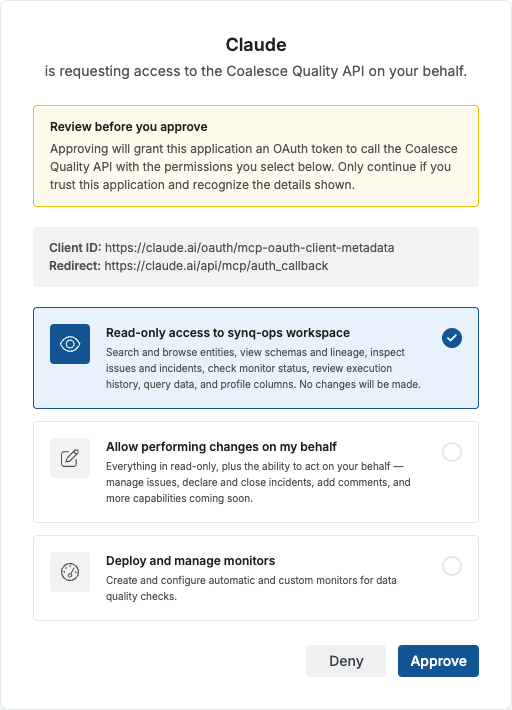
1. When your AI client connects for the first time, your browser will open automatically
2. If you are already logged in to Coalesce Quality, the consent screen appears directly. Otherwise, you will be asked to log in first.
3. Select the permission level you want to grant (see [Permissions](#permissions) below)
4. Click **Approve** to authorize
 All actions performed through MCP are tracked as done on behalf of the authenticated user, and carry a **via MCP** marker so the audit trail distinguishes AI-driven actions from ones performed directly in the app.
### Static tokens (legacy)
Long-lived workspace tokens (prefixed `st-…`) created under **Settings → API** still work with the MCP server — pass one as a `Bearer` token in the `Authorization` header of the MCP connection. Use this only when OAuth is not an option (for example, headless automation without a real user, or when [user API access is disabled](#disabling-user-api-access) for the workspace).
We recommend OAuth for all interactive AI clients: actions are attributed to the real user rather than to a shared service identity, tokens can be revoked per-user, and the scopes granted match what that user's role already allows.
### Permissions
During authorization, you choose what level of access to grant. The available permission scopes on the consent screen are determined by your user role in the workspace — you will only see options that your role allows.
| Permission | What it allows |
| --------------------- | ---------------------------------------------------------------------------------------------------------------------------------------------------------------------------------------------------------------------------------------------------------------------------------------------------------------------------------------------- |
| **Read-only access** | Search and browse entities, browse the folder hierarchy, resolve ResolverQL selections to entities, view schemas and lineage, inspect issues and incidents, review execution history, query data, and profile columns, list existing monitors and SQL tests, and browse data products, domains, owners, and saved views. No changes are made. |
| **Write access** | Everything in read-only, plus acting on your behalf — manage issues, declare and close incidents, add comments, and manage your own saved views. |
| **Governance access** | Manage the governance surface — create, edit, and delete data products, domains and their hierarchy, owners, their notification channels, and the alert routing for owned assets. This is independent of Write, not a superset — grant it when the assistant should manage the catalog and alert routing without touching issues or incidents. |
| **Deploy access** | Author data quality checks — create, configure, and delete monitors, table-stats monitors, SQL tests, and query-based deployment rules (including listing and previewing rules). This is independent of Write, not a superset — grant it when the assistant should manage checks without touching issues or incidents. |
The set of MCP tools available to your AI assistant depends on the permissions you grant during authorization. For example, if you only grant read-only access, tools that modify data (like managing issues or deploying monitors) will not be available.
### Disabling User API Access
Workspace admins can prevent users from authorizing third-party applications (including MCP clients) to access the Coalesce Quality API via OAuth. The toggle lives in **Settings → Workspace** and can be flipped on or off at any time by a user with the admin role — individual users do not need to take any action when the setting changes.
All actions performed through MCP are tracked as done on behalf of the authenticated user, and carry a **via MCP** marker so the audit trail distinguishes AI-driven actions from ones performed directly in the app.
### Static tokens (legacy)
Long-lived workspace tokens (prefixed `st-…`) created under **Settings → API** still work with the MCP server — pass one as a `Bearer` token in the `Authorization` header of the MCP connection. Use this only when OAuth is not an option (for example, headless automation without a real user, or when [user API access is disabled](#disabling-user-api-access) for the workspace).
We recommend OAuth for all interactive AI clients: actions are attributed to the real user rather than to a shared service identity, tokens can be revoked per-user, and the scopes granted match what that user's role already allows.
### Permissions
During authorization, you choose what level of access to grant. The available permission scopes on the consent screen are determined by your user role in the workspace — you will only see options that your role allows.
| Permission | What it allows |
| --------------------- | ---------------------------------------------------------------------------------------------------------------------------------------------------------------------------------------------------------------------------------------------------------------------------------------------------------------------------------------------- |
| **Read-only access** | Search and browse entities, browse the folder hierarchy, resolve ResolverQL selections to entities, view schemas and lineage, inspect issues and incidents, review execution history, query data, and profile columns, list existing monitors and SQL tests, and browse data products, domains, owners, and saved views. No changes are made. |
| **Write access** | Everything in read-only, plus acting on your behalf — manage issues, declare and close incidents, add comments, and manage your own saved views. |
| **Governance access** | Manage the governance surface — create, edit, and delete data products, domains and their hierarchy, owners, their notification channels, and the alert routing for owned assets. This is independent of Write, not a superset — grant it when the assistant should manage the catalog and alert routing without touching issues or incidents. |
| **Deploy access** | Author data quality checks — create, configure, and delete monitors, table-stats monitors, SQL tests, and query-based deployment rules (including listing and previewing rules). This is independent of Write, not a superset — grant it when the assistant should manage checks without touching issues or incidents. |
The set of MCP tools available to your AI assistant depends on the permissions you grant during authorization. For example, if you only grant read-only access, tools that modify data (like managing issues or deploying monitors) will not be available.
### Disabling User API Access
Workspace admins can prevent users from authorizing third-party applications (including MCP clients) to access the Coalesce Quality API via OAuth. The toggle lives in **Settings → Workspace** and can be flipped on or off at any time by a user with the admin role — individual users do not need to take any action when the setting changes.
 While this is enabled:
* New OAuth consent attempts from MCP clients are rejected with an explanatory message on the consent screen.
* Existing OAuth tokens issued to users stop working.
* Workspace-provisioned long-lived tokens (`st-…`) and client credentials continue to work — use those if you need programmatic access in this mode.
Turning the setting back off immediately restores the OAuth path; users will need to re-authorize their MCP client the next time it connects.
## Coalesce Quality MCP Tools
Once connected, your AI assistant has access to a wide range of tools for working with your data infrastructure. The tables below group them by purpose.
### Session and Identity
| Tool | Description |
| ------------ | ------------------------------------------------------------------------------------------------------------------------------------------------------------------------------------------------- |
| `iam` | Report the authenticated caller's identity — workspace, granted permission scopes, and the associated Coalesce Quality user. Useful for confirming which workspace and access level a session has |
| `list_users` | List workspace members with an optional name/email filter — used to find the exact email for incident ownership |
### Discovery and Search
| Tool | Description |
| ------------------ | --------------------------------------------------------------------------------------------------------------------------------------------------------------------------------------- |
| `search_entities` | Search for entities by name, description, and other metadata with optional filtering by entity types |
| `sample_entities` | Get entity count sampling by type for search queries to understand distribution before detailed searches |
| `resolve_query` | Compile and evaluate a [ResolverQL](#deployment-rules) selection (via `describe_resolver_ql`) and return the matched entity ids, paginated — the general author → resolve → refine loop |
| `list_annotations` | List all available annotations with their usage counts across entities |
### Core Entity Operations
| Tool | Description |
| -------------------------------------- | -------------------------------------------------------------------------------------------------------------------------------------------------- |
| `get_entity_details` | Retrieve detailed information about a specific data entity including properties, metadata, current state, and the folder breadcrumb(s) it lives in |
| `batch_entity_details` | Get details for multiple entities simultaneously (including folder breadcrumbs) - more efficient than multiple individual calls |
| `get_schema` | Retrieve schema definition including column names, types, and constraints for table-like entities |
| `get_database_coordinates_from_entity` | Retrieve physical DWH coordinates (dialect, connection, instance, database, schema, object) for table entities |
| `get_entity_from_database_coordinates` | Map SQL table references (fully/partially/unqualified) to Coalesce Quality entity IDs |
| `get_code` | Access the latest version of source code that defines or implements data entities (SQL definitions, dbt models, etc.) |
### Folder Navigation
Browse the catalog's folder / containment hierarchy — the roots data hangs from, the sub-folders under any folder, the folder(s) an entity lives in, and the entities inside a folder. Read-only; membership is **shallow by default** (one level per browse, direct members only) — set `deep=true` or browse sub-folders in turn to recurse. Use these to discover the real folder ids that [ResolverQL](#deployment-rules)'s `in_folder(...)` operand needs.
| Tool | Description |
| --------------------- | ------------------------------------------------------------------------------------------------------------------------------------- |
| `browse_folders` | Browse one level of the hierarchy: the roots (no argument) or a folder's direct sub-folders and direct members |
| `folder_of` | Return the folder breadcrumb(s) each given entity lives in — pair with `list_folder_members` on the immediate parent to list siblings |
| `list_folder_members` | List the entity ids contained in a folder, paginated; `deep=true` includes nested sub-folders, `types` narrows by entity type |
### Data Lineage Analysis
**Comprehensive Lineage**
| Tool | Description |
| ------------- | ------------------------------------------------------------------------------------------------------------ |
| `get_lineage` | Advanced dependency analysis with directional control (upstream, downstream, or both) and configurable depth |
**Upstream Analysis**
| Tool | Description |
| ------------------------------------- | --------------------------------------------------------------------------------------------------------- |
| `get_upstream_dependencies` | Find all upstream dependencies with configurable traversal distance |
| `get_immediate_upstream_dependencies` | Find only direct upstream dependencies for quick analysis |
| `get_upstream_sources` | Trace data lineage to find original data sources (dbt sources, SQLMesh external models, Coalesce sources) |
**Downstream Analysis**
| Tool | Description |
| --------------------------------------- | --------------------------------------------------------------------- |
| `get_downstream_dependencies` | Find all downstream dependencies with configurable traversal distance |
| `get_immediate_downstream_dependencies` | Find only direct downstream dependencies for quick analysis |
**Cross-Entity Analysis**
| Tool | Description |
| ---------------------------------- | --------------------------------------------------------------------------------- |
| `get_common_upstream_dependencies` | Find shared dependencies between two entities using connected components analysis |
### Orchestration
| Tool | Description |
| ------------------- | ----------------------------------------------------------------------------------------------------------------------------- |
| `get_orchestration` | Get orchestration relationships for entities - shows what orchestrates them (upstream) and what they orchestrate (downstream) |
### Issue and Incident Management
| Tool | Description |
| ---------------------- | --------------------------------------------------------------------------------------------------------------------------------------------------------------------------------------------------------------------------------------- |
| `list_open_issues` | List all open issues currently requiring attention with optional entity filtering |
| `list_open_incidents` | List all currently open incidents that need attention or resolution with optional entity filtering |
| `get_issue` | Return the core issue record for a specific issue ID (status, severity, trigger entity) |
| `get_issue_details` | Return the issue record plus the first page of comments and — for monitor-triggered issues — the monitor configuration and schema of the monitored entity. Prefer this over `get_issue` when you need context to reason about the issue |
| `get_issue_comments` | Get comments and discussions on issues if available |
| `get_incident_details` | Retrieve detailed information about a specific incident by ID, including attached issues, state, and comment timeline |
| `list_history` | Find historical incidents and issues to identify patterns and recurring problems |
### Impact Analysis
| Tool | Description |
| ------------------- | ------------------------------------------------------------------------------------------------- |
| `get_entity_impact` | Get impact analysis showing all entities and systems affected if there was an issue on the entity |
| `get_issue_impact` | Get impact analysis showing all entities and systems affected by a specific issue |
### Data Quality and Monitoring
| Tool | Description |
| --------------------------- | --------------------------------------------------------------------------------------------------------------------------------------------------------- |
| `list_checks` | Retrieve all data quality checks configured for a specific entity (direct and inherited) |
| `get_monitor` | Retrieve detailed information about a specific monitor including configuration and status |
| `get_monitor_predictions` | Return recent model predictions for a monitor with expected vs actual values and confidence bands — useful for diagnosing miscalibrated anomaly detection |
| `get_entity_metrics` | Return raw metric timeseries (row counts, freshness, etc.) for an entity; resolves logical assets (e.g., dbt models) to their underlying physical tables |
| `list_monitors` | List custom monitors, optionally filtered by asset, config, ids, or a name substring |
| `list_sql_tests` | List SQL tests, optionally filtered by asset, config, or ids |
| `list_table_stats_monitors` | List table-stats monitors, optionally filtered by asset or ids |
### Executions
| Tool | Description |
| ----------------------- | ------------------------------------------------------------------------------------------------------------- |
| `get_latest_executions` | Get the most recent execution for each specified entity (monitors, dbt models, airflow tasks, etc.) |
| `list_executions` | List execution history for specific entities with filtering by time range, status, and execution type |
| `batch_executions` | Get detailed information for specific executions by their IDs |
| `summarise_executions` | Get aggregated execution statistics - counts by type and status, time ranges, and latest execution per entity |
### SQL Generation for Data Analysis
These tools generate the SQL that Coalesce Quality would run to analyse data, but the MCP server does not execute queries against your warehouse. The response includes the full `executedSql` — run it yourself (or let your AI client run it through a separate warehouse connection) to get actual results. This keeps your data inside your own warehouse and avoids giving the MCP server any standing database credentials.
| Tool | Description |
| ---------------------- | ---------------------------------------------------------------------------------------------------------------------------------------------------------------------------------------------------------------------------------------------------------------------------------------------------- |
| `execute_monitor` | Generate the SQL a monitor would run, including any extra segmentation, `WHERE` clauses, or time filters you pass in. Similar in spirit to `get_code` but for the check SQL — `get_code` returns the asset's definition, `execute_monitor` returns the query the monitor executes against that asset |
| `profile_columns` | Generate SQL that computes statistics for specific columns (supports String, Numeric, and Time types) |
| `sample_column_values` | Generate SQL that returns the frequency distribution of values for specific columns, with optional time-based filtering |
### Change Tracking and History
**Database Changes**
| Tool | Description |
| ----------------------------- | --------------------------------------------------------------------------- |
| `list_database_changes` | Retrieve history of schema and SQL definition changes for specific entities |
| `get_database_change_details` | Return full change details for specific change IDs |
**Git Integration**
| Tool | Description |
| ----------------- | ---------------------------------------------------------------------------------------- |
| `list_commits` | List commits that affect a specific entity, providing git history and change information |
| `get_commit_diff` | Retrieve exact diff content of specific commit changes with optional path filtering |
### Write Actions
The tools in this section modify workspace data and require **Write access** (for issue/incident actions) during OAuth consent. If the user granted only read-only access, these tools will not appear in the client.
| Tool | Required scope | Description |
| ------------------ | -------------- | -------------------------------------------------------------------------------------------------------------------------------------------------------------------------- |
| `set_issue_status` | Write | Set the status of a single issue (e.g., mark as expected behaviour, fixed upstream, no action needed). An optional note is posted as a comment to preserve the audit trail |
| `add_comment` | Write | Post a Markdown comment on an issue or incident, attributed to the authenticated user |
| `create_incident` | Write | Create a new incident grouping one or more related issues under a shared name for coordinated investigation |
| `update_incident` | Write | Edit an existing incident — rename, change state, reassign owner, or attach/detach issues in a single call |
### Managing Monitors and Tests
These tools create and change data quality checks — monitors, table-stats monitors, and SQL tests all require **Deploy access**. Start with `describe_check_types` (available without any granted scope) to pick the right check type for a goal.
Two safeguards apply to every write here:
* **Full replace, not patch.** `update_*` tools replace the whole object — fetch the current definition with the matching `list_*` tool, apply your edits, and send the complete object. Omitted fields are cleared.
* **Confirmation-gated changes.** A change that would reset a check's baseline (retrain anomaly detection / re-run a test) or overwrite a check owned by the app UI or a YAML config is not applied on the first call. The tool reports what needs approval; re-call only after the user explicitly confirms. The assistant never self-confirms.
| Tool | Required scope | Description |
| ---------------------------- | -------------- | ------------------------------------------------------------------------------------------------------------------------------------------------------------------------------------------------------------------------------------------------------------------------ |
| `describe_check_types` | None | Return the catalog of check types the server can create (custom monitors, SQL tests, table-stats monitors) with guidance on which fits a given data-quality goal, down to the sub-type level. A static reference — available in any session regardless of granted scopes |
| `create_monitors` | Deploy | Create one or more custom monitors — anomaly, freshness, volume, field-stats, category distribution, and more. Ids are deterministic, so identical re-runs are idempotent |
| `update_monitors` | Deploy | Update custom monitors by id (full replace) |
| `delete_monitors` | Deploy | Delete custom monitors by id |
| `create_table_stats_monitor` | Deploy | Create and deploy a table-stats monitor (row count, load delay) on a single warehouse table in one step, reading cheap warehouse metadata rather than querying the table each run |
| `update_table_stats_monitor` | Deploy | Update a table-stats monitor by id and redeploy (full replace of the metric set) |
| `delete_table_stats_monitor` | Deploy | Disable table-stats monitoring for the given asset paths |
| `create_sql_tests` | Deploy | Create one or more SQL tests from a template (not-null, unique, accepted/rejected values, relationships, freshness, min/max, business rules, etc.) or a raw SQL expression |
| `update_sql_tests` | Deploy | Update SQL tests by id (full replace) |
| `delete_sql_tests` | Deploy | Delete SQL tests by id |
### Deployment Rules
Deployment rules deploy monitors automatically to every asset matching a **ResolverQL** selection query, rather than to a fixed list of paths. All of these tools — listing, previewing, deploying, and deleting rules — require **Deploy access**. Call `describe_resolver_ql` for the query grammar, `preview_deployment_rule` to see the exact impact, and only then `deploy_deployment_rule` — the deploy and delete tools are confirmation-gated and never self-confirmed.
| Tool | Required scope | Description |
| ------------------------- | -------------- | ------------------------------------------------------------------------------------------------------------------------------------------------------------------------------------------------------------------------------------------------------------ |
| `describe_resolver_ql` | None | Return a reference for authoring ResolverQL selection queries — syntax, the common functions and asset-type names, worked recipes, and the metric / sensitivity / severity enums. A static reference — available in any session regardless of granted scopes |
| `list_deployment_rules` | Deploy | List query-based deployment rules |
| `get_deployment_rule` | Deploy | Return one rule by id with its full settings and the canonical ResolverQL selection string |
| `preview_deployment_rule` | Deploy | Resolve a rule's query and return the monitors that would be created, deleted, or kept if it were deployed now, plus assets skipped — side-effect-free, and doubles as query validation |
| `deploy_deployment_rule` | Deploy | Create or update a rule and materialize its monitors. Gated: preview first, then re-call with confirmation after the user approves |
| `delete_deployment_rule` | Deploy | Delete a rule and the monitors it owns. Gated the same way as deploy |
### Data Products
Data products are named, owned groupings of assets defined by a membership query (authored as [ResolverQL](#deployment-rules), via `describe_resolver_ql`) or pinned asset ids.
The `save_data_product` and `delete_data_product` tools require **Governance access** during OAuth consent. They are confirmation-gated: the first call reports what would change and never self-confirms — re-call only after the user approves. A product managed by an external source (e.g. Atlan) additionally requires an explicit overwrite confirmation.
| Tool | Required scope | Description |
| --------------------------- | -------------- | --------------------------------------------------------------------------------------------------------------------------- |
| `list_data_products` | Read | List data products in the workspace, paginated, with per-priority and per-source breakdowns. Definitions omitted by default |
| `get_data_product` | Read | Fetch one or more data products by id with full detail, including the membership definition rendered as ResolverQL |
| `list_data_product_members` | Read | Resolve a data product's membership and return the entity ids of the assets that currently belong to it |
| `save_data_product` | Governance | Create or update a data product and, in the same call, replace its membership definition. Gated |
| `delete_data_product` | Governance | Delete a data product (soft-delete by default; optional purge). Gated |
### Domains
Domains are named areas of ownership that group the assets, data products and sub-domains belonging to one part of the business. They nest: a domain can sit under a parent, and a parent's membership includes everything its sub-domains contain. Walk the hierarchy with `list_domains` — omit `parent_id` for every domain at any level, pass a domain id for that domain's direct children, or pass an empty string for top-level domains only.
Membership is a list of parts combined with OR: a pinned asset, a whole data product, a whole other domain, or a [ResolverQL](#deployment-rules) selection query. Unlike a data product, a domain is not a leaf — it can reference other domains and data products, and membership is resolved recursively. A write that would make those references form a loop is rejected and names the offending path.
The `save_domain` and `delete_domain` tools require **Governance access** during OAuth consent. They are confirmation-gated: the first call reports what would change and never self-confirms — re-call only after the user approves. A domain managed by an external source (e.g. Atlan) additionally requires an explicit overwrite confirmation.
`delete_domain` reports how many direct sub-domains the domain has before anything is deleted, because the two delete modes differ: a soft delete leaves those sub-domains in place, parented to a deleted domain, while a purge is refused while any of them still exist.
| Tool | Required scope | Description |
| --------------------- | -------------- | ------------------------------------------------------------------------------------------------------------------------------------------------------------------------------------------------ |
| `list_domains` | Read | List domains in the workspace, paginated, with a per-source breakdown and top-level / sub-domain counts. Filter by `parent_id` to walk the hierarchy. Membership definitions are not included |
| `get_domain` | Read | Fetch one or more domains by id with full detail, including the membership definition with query parts rendered as ResolverQL |
| `list_domain_members` | Read | Resolve a domain's membership and return the entity ids of the assets that currently belong to it — including everything contributed by the data products, domains and sub-domains it references |
| `save_domain` | Governance | Create or update a domain, set or clear its parent, and replace its membership definition in the same call. Gated |
| `delete_domain` | Governance | Delete a domain (soft-delete by default; optional purge). Gated |
### Owners and Ownership
Owners are named responsible parties with notification channels (contacts); ownerships assign assets to an owner and configure the alerts routed there. This is the "alert routing as code" surface.
The `save_owner` and `delete_owner` tools require **Governance access**. `save_owner` is a single use-case call that upserts the owner and its ownerships together. Both are confirmation-gated and never self-confirmed; overwriting an external-source (e.g. Atlan) owner requires an explicit overwrite confirmation.
| Tool | Required scope | Description |
| ----------------- | -------------- | ------------------------------------------------------------------------------------------------------------------ |
| `list_owners` | Read | List owners with contact counts (and, optionally, ownership counts) |
| `get_owner` | Read | Fetch one or more owners by id with their contacts and ownerships (assigned assets + alert config) |
| `list_ownerships` | Read | List ownerships — all of one owner, or a specific set by id — showing each asset selection and alert configuration |
| `save_owner` | Governance | Create or update an owner and upsert its ownerships (owner + ownerships in one call). Gated |
| `delete_owner` | Governance | Delete an owner and all its ownerships, or just one ownership when an ownership id is given. Gated |
### Saved Views
Saved views are named, reusable selections over entities (or the checks / issues screens) with display configuration, sharing, and per-user pinning. Selections are authored as ResolverQL (via `describe_resolver_ql`).
`save_saved_view` and `delete_saved_view` require **Write access** (saved views are largely a per-user surface). `set_saved_view_pin` is available on read access — pinning is a per-user preference and changes nothing about the view. `save_saved_view` is confirmation-gated; editing a view you do not own, or changing its visibility / grants, requires an explicit overwrite confirmation.
| Tool | Required scope | Description |
| -------------------- | -------------- | --------------------------------------------------------------------------------------------------------------------------------- |
| `list_saved_views` | Read | List the saved views you can see, with a per-relationship (mine / shared / granted) breakdown |
| `get_saved_view` | Read | Fetch one or more saved views by id with the selection (rendered as ResolverQL), sharing, grants, your permissions, and pin state |
| `set_saved_view_pin` | Read | Pin or unpin a saved view to your own main screen (per-user preference) |
| `save_saved_view` | Write | Create or update a saved view. Gated |
| `delete_saved_view` | Write | Delete a saved view. Gated |
### Utilities
| Tool | Description |
| ------------------------ | ------------------------------------------------------------------------------------------------ |
| `batch_urls` | Generate Coalesce Quality application URLs for multiple entities and issues for easy navigation |
| `submit_feature_request` | Submit a feature request or product feedback to the Coalesce Quality team from your AI assistant |
While this is enabled:
* New OAuth consent attempts from MCP clients are rejected with an explanatory message on the consent screen.
* Existing OAuth tokens issued to users stop working.
* Workspace-provisioned long-lived tokens (`st-…`) and client credentials continue to work — use those if you need programmatic access in this mode.
Turning the setting back off immediately restores the OAuth path; users will need to re-authorize their MCP client the next time it connects.
## Coalesce Quality MCP Tools
Once connected, your AI assistant has access to a wide range of tools for working with your data infrastructure. The tables below group them by purpose.
### Session and Identity
| Tool | Description |
| ------------ | ------------------------------------------------------------------------------------------------------------------------------------------------------------------------------------------------- |
| `iam` | Report the authenticated caller's identity — workspace, granted permission scopes, and the associated Coalesce Quality user. Useful for confirming which workspace and access level a session has |
| `list_users` | List workspace members with an optional name/email filter — used to find the exact email for incident ownership |
### Discovery and Search
| Tool | Description |
| ------------------ | --------------------------------------------------------------------------------------------------------------------------------------------------------------------------------------- |
| `search_entities` | Search for entities by name, description, and other metadata with optional filtering by entity types |
| `sample_entities` | Get entity count sampling by type for search queries to understand distribution before detailed searches |
| `resolve_query` | Compile and evaluate a [ResolverQL](#deployment-rules) selection (via `describe_resolver_ql`) and return the matched entity ids, paginated — the general author → resolve → refine loop |
| `list_annotations` | List all available annotations with their usage counts across entities |
### Core Entity Operations
| Tool | Description |
| -------------------------------------- | -------------------------------------------------------------------------------------------------------------------------------------------------- |
| `get_entity_details` | Retrieve detailed information about a specific data entity including properties, metadata, current state, and the folder breadcrumb(s) it lives in |
| `batch_entity_details` | Get details for multiple entities simultaneously (including folder breadcrumbs) - more efficient than multiple individual calls |
| `get_schema` | Retrieve schema definition including column names, types, and constraints for table-like entities |
| `get_database_coordinates_from_entity` | Retrieve physical DWH coordinates (dialect, connection, instance, database, schema, object) for table entities |
| `get_entity_from_database_coordinates` | Map SQL table references (fully/partially/unqualified) to Coalesce Quality entity IDs |
| `get_code` | Access the latest version of source code that defines or implements data entities (SQL definitions, dbt models, etc.) |
### Folder Navigation
Browse the catalog's folder / containment hierarchy — the roots data hangs from, the sub-folders under any folder, the folder(s) an entity lives in, and the entities inside a folder. Read-only; membership is **shallow by default** (one level per browse, direct members only) — set `deep=true` or browse sub-folders in turn to recurse. Use these to discover the real folder ids that [ResolverQL](#deployment-rules)'s `in_folder(...)` operand needs.
| Tool | Description |
| --------------------- | ------------------------------------------------------------------------------------------------------------------------------------- |
| `browse_folders` | Browse one level of the hierarchy: the roots (no argument) or a folder's direct sub-folders and direct members |
| `folder_of` | Return the folder breadcrumb(s) each given entity lives in — pair with `list_folder_members` on the immediate parent to list siblings |
| `list_folder_members` | List the entity ids contained in a folder, paginated; `deep=true` includes nested sub-folders, `types` narrows by entity type |
### Data Lineage Analysis
**Comprehensive Lineage**
| Tool | Description |
| ------------- | ------------------------------------------------------------------------------------------------------------ |
| `get_lineage` | Advanced dependency analysis with directional control (upstream, downstream, or both) and configurable depth |
**Upstream Analysis**
| Tool | Description |
| ------------------------------------- | --------------------------------------------------------------------------------------------------------- |
| `get_upstream_dependencies` | Find all upstream dependencies with configurable traversal distance |
| `get_immediate_upstream_dependencies` | Find only direct upstream dependencies for quick analysis |
| `get_upstream_sources` | Trace data lineage to find original data sources (dbt sources, SQLMesh external models, Coalesce sources) |
**Downstream Analysis**
| Tool | Description |
| --------------------------------------- | --------------------------------------------------------------------- |
| `get_downstream_dependencies` | Find all downstream dependencies with configurable traversal distance |
| `get_immediate_downstream_dependencies` | Find only direct downstream dependencies for quick analysis |
**Cross-Entity Analysis**
| Tool | Description |
| ---------------------------------- | --------------------------------------------------------------------------------- |
| `get_common_upstream_dependencies` | Find shared dependencies between two entities using connected components analysis |
### Orchestration
| Tool | Description |
| ------------------- | ----------------------------------------------------------------------------------------------------------------------------- |
| `get_orchestration` | Get orchestration relationships for entities - shows what orchestrates them (upstream) and what they orchestrate (downstream) |
### Issue and Incident Management
| Tool | Description |
| ---------------------- | --------------------------------------------------------------------------------------------------------------------------------------------------------------------------------------------------------------------------------------- |
| `list_open_issues` | List all open issues currently requiring attention with optional entity filtering |
| `list_open_incidents` | List all currently open incidents that need attention or resolution with optional entity filtering |
| `get_issue` | Return the core issue record for a specific issue ID (status, severity, trigger entity) |
| `get_issue_details` | Return the issue record plus the first page of comments and — for monitor-triggered issues — the monitor configuration and schema of the monitored entity. Prefer this over `get_issue` when you need context to reason about the issue |
| `get_issue_comments` | Get comments and discussions on issues if available |
| `get_incident_details` | Retrieve detailed information about a specific incident by ID, including attached issues, state, and comment timeline |
| `list_history` | Find historical incidents and issues to identify patterns and recurring problems |
### Impact Analysis
| Tool | Description |
| ------------------- | ------------------------------------------------------------------------------------------------- |
| `get_entity_impact` | Get impact analysis showing all entities and systems affected if there was an issue on the entity |
| `get_issue_impact` | Get impact analysis showing all entities and systems affected by a specific issue |
### Data Quality and Monitoring
| Tool | Description |
| --------------------------- | --------------------------------------------------------------------------------------------------------------------------------------------------------- |
| `list_checks` | Retrieve all data quality checks configured for a specific entity (direct and inherited) |
| `get_monitor` | Retrieve detailed information about a specific monitor including configuration and status |
| `get_monitor_predictions` | Return recent model predictions for a monitor with expected vs actual values and confidence bands — useful for diagnosing miscalibrated anomaly detection |
| `get_entity_metrics` | Return raw metric timeseries (row counts, freshness, etc.) for an entity; resolves logical assets (e.g., dbt models) to their underlying physical tables |
| `list_monitors` | List custom monitors, optionally filtered by asset, config, ids, or a name substring |
| `list_sql_tests` | List SQL tests, optionally filtered by asset, config, or ids |
| `list_table_stats_monitors` | List table-stats monitors, optionally filtered by asset or ids |
### Executions
| Tool | Description |
| ----------------------- | ------------------------------------------------------------------------------------------------------------- |
| `get_latest_executions` | Get the most recent execution for each specified entity (monitors, dbt models, airflow tasks, etc.) |
| `list_executions` | List execution history for specific entities with filtering by time range, status, and execution type |
| `batch_executions` | Get detailed information for specific executions by their IDs |
| `summarise_executions` | Get aggregated execution statistics - counts by type and status, time ranges, and latest execution per entity |
### SQL Generation for Data Analysis
These tools generate the SQL that Coalesce Quality would run to analyse data, but the MCP server does not execute queries against your warehouse. The response includes the full `executedSql` — run it yourself (or let your AI client run it through a separate warehouse connection) to get actual results. This keeps your data inside your own warehouse and avoids giving the MCP server any standing database credentials.
| Tool | Description |
| ---------------------- | ---------------------------------------------------------------------------------------------------------------------------------------------------------------------------------------------------------------------------------------------------------------------------------------------------- |
| `execute_monitor` | Generate the SQL a monitor would run, including any extra segmentation, `WHERE` clauses, or time filters you pass in. Similar in spirit to `get_code` but for the check SQL — `get_code` returns the asset's definition, `execute_monitor` returns the query the monitor executes against that asset |
| `profile_columns` | Generate SQL that computes statistics for specific columns (supports String, Numeric, and Time types) |
| `sample_column_values` | Generate SQL that returns the frequency distribution of values for specific columns, with optional time-based filtering |
### Change Tracking and History
**Database Changes**
| Tool | Description |
| ----------------------------- | --------------------------------------------------------------------------- |
| `list_database_changes` | Retrieve history of schema and SQL definition changes for specific entities |
| `get_database_change_details` | Return full change details for specific change IDs |
**Git Integration**
| Tool | Description |
| ----------------- | ---------------------------------------------------------------------------------------- |
| `list_commits` | List commits that affect a specific entity, providing git history and change information |
| `get_commit_diff` | Retrieve exact diff content of specific commit changes with optional path filtering |
### Write Actions
The tools in this section modify workspace data and require **Write access** (for issue/incident actions) during OAuth consent. If the user granted only read-only access, these tools will not appear in the client.
| Tool | Required scope | Description |
| ------------------ | -------------- | -------------------------------------------------------------------------------------------------------------------------------------------------------------------------- |
| `set_issue_status` | Write | Set the status of a single issue (e.g., mark as expected behaviour, fixed upstream, no action needed). An optional note is posted as a comment to preserve the audit trail |
| `add_comment` | Write | Post a Markdown comment on an issue or incident, attributed to the authenticated user |
| `create_incident` | Write | Create a new incident grouping one or more related issues under a shared name for coordinated investigation |
| `update_incident` | Write | Edit an existing incident — rename, change state, reassign owner, or attach/detach issues in a single call |
### Managing Monitors and Tests
These tools create and change data quality checks — monitors, table-stats monitors, and SQL tests all require **Deploy access**. Start with `describe_check_types` (available without any granted scope) to pick the right check type for a goal.
Two safeguards apply to every write here:
* **Full replace, not patch.** `update_*` tools replace the whole object — fetch the current definition with the matching `list_*` tool, apply your edits, and send the complete object. Omitted fields are cleared.
* **Confirmation-gated changes.** A change that would reset a check's baseline (retrain anomaly detection / re-run a test) or overwrite a check owned by the app UI or a YAML config is not applied on the first call. The tool reports what needs approval; re-call only after the user explicitly confirms. The assistant never self-confirms.
| Tool | Required scope | Description |
| ---------------------------- | -------------- | ------------------------------------------------------------------------------------------------------------------------------------------------------------------------------------------------------------------------------------------------------------------------ |
| `describe_check_types` | None | Return the catalog of check types the server can create (custom monitors, SQL tests, table-stats monitors) with guidance on which fits a given data-quality goal, down to the sub-type level. A static reference — available in any session regardless of granted scopes |
| `create_monitors` | Deploy | Create one or more custom monitors — anomaly, freshness, volume, field-stats, category distribution, and more. Ids are deterministic, so identical re-runs are idempotent |
| `update_monitors` | Deploy | Update custom monitors by id (full replace) |
| `delete_monitors` | Deploy | Delete custom monitors by id |
| `create_table_stats_monitor` | Deploy | Create and deploy a table-stats monitor (row count, load delay) on a single warehouse table in one step, reading cheap warehouse metadata rather than querying the table each run |
| `update_table_stats_monitor` | Deploy | Update a table-stats monitor by id and redeploy (full replace of the metric set) |
| `delete_table_stats_monitor` | Deploy | Disable table-stats monitoring for the given asset paths |
| `create_sql_tests` | Deploy | Create one or more SQL tests from a template (not-null, unique, accepted/rejected values, relationships, freshness, min/max, business rules, etc.) or a raw SQL expression |
| `update_sql_tests` | Deploy | Update SQL tests by id (full replace) |
| `delete_sql_tests` | Deploy | Delete SQL tests by id |
### Deployment Rules
Deployment rules deploy monitors automatically to every asset matching a **ResolverQL** selection query, rather than to a fixed list of paths. All of these tools — listing, previewing, deploying, and deleting rules — require **Deploy access**. Call `describe_resolver_ql` for the query grammar, `preview_deployment_rule` to see the exact impact, and only then `deploy_deployment_rule` — the deploy and delete tools are confirmation-gated and never self-confirmed.
| Tool | Required scope | Description |
| ------------------------- | -------------- | ------------------------------------------------------------------------------------------------------------------------------------------------------------------------------------------------------------------------------------------------------------ |
| `describe_resolver_ql` | None | Return a reference for authoring ResolverQL selection queries — syntax, the common functions and asset-type names, worked recipes, and the metric / sensitivity / severity enums. A static reference — available in any session regardless of granted scopes |
| `list_deployment_rules` | Deploy | List query-based deployment rules |
| `get_deployment_rule` | Deploy | Return one rule by id with its full settings and the canonical ResolverQL selection string |
| `preview_deployment_rule` | Deploy | Resolve a rule's query and return the monitors that would be created, deleted, or kept if it were deployed now, plus assets skipped — side-effect-free, and doubles as query validation |
| `deploy_deployment_rule` | Deploy | Create or update a rule and materialize its monitors. Gated: preview first, then re-call with confirmation after the user approves |
| `delete_deployment_rule` | Deploy | Delete a rule and the monitors it owns. Gated the same way as deploy |
### Data Products
Data products are named, owned groupings of assets defined by a membership query (authored as [ResolverQL](#deployment-rules), via `describe_resolver_ql`) or pinned asset ids.
The `save_data_product` and `delete_data_product` tools require **Governance access** during OAuth consent. They are confirmation-gated: the first call reports what would change and never self-confirms — re-call only after the user approves. A product managed by an external source (e.g. Atlan) additionally requires an explicit overwrite confirmation.
| Tool | Required scope | Description |
| --------------------------- | -------------- | --------------------------------------------------------------------------------------------------------------------------- |
| `list_data_products` | Read | List data products in the workspace, paginated, with per-priority and per-source breakdowns. Definitions omitted by default |
| `get_data_product` | Read | Fetch one or more data products by id with full detail, including the membership definition rendered as ResolverQL |
| `list_data_product_members` | Read | Resolve a data product's membership and return the entity ids of the assets that currently belong to it |
| `save_data_product` | Governance | Create or update a data product and, in the same call, replace its membership definition. Gated |
| `delete_data_product` | Governance | Delete a data product (soft-delete by default; optional purge). Gated |
### Domains
Domains are named areas of ownership that group the assets, data products and sub-domains belonging to one part of the business. They nest: a domain can sit under a parent, and a parent's membership includes everything its sub-domains contain. Walk the hierarchy with `list_domains` — omit `parent_id` for every domain at any level, pass a domain id for that domain's direct children, or pass an empty string for top-level domains only.
Membership is a list of parts combined with OR: a pinned asset, a whole data product, a whole other domain, or a [ResolverQL](#deployment-rules) selection query. Unlike a data product, a domain is not a leaf — it can reference other domains and data products, and membership is resolved recursively. A write that would make those references form a loop is rejected and names the offending path.
The `save_domain` and `delete_domain` tools require **Governance access** during OAuth consent. They are confirmation-gated: the first call reports what would change and never self-confirms — re-call only after the user approves. A domain managed by an external source (e.g. Atlan) additionally requires an explicit overwrite confirmation.
`delete_domain` reports how many direct sub-domains the domain has before anything is deleted, because the two delete modes differ: a soft delete leaves those sub-domains in place, parented to a deleted domain, while a purge is refused while any of them still exist.
| Tool | Required scope | Description |
| --------------------- | -------------- | ------------------------------------------------------------------------------------------------------------------------------------------------------------------------------------------------ |
| `list_domains` | Read | List domains in the workspace, paginated, with a per-source breakdown and top-level / sub-domain counts. Filter by `parent_id` to walk the hierarchy. Membership definitions are not included |
| `get_domain` | Read | Fetch one or more domains by id with full detail, including the membership definition with query parts rendered as ResolverQL |
| `list_domain_members` | Read | Resolve a domain's membership and return the entity ids of the assets that currently belong to it — including everything contributed by the data products, domains and sub-domains it references |
| `save_domain` | Governance | Create or update a domain, set or clear its parent, and replace its membership definition in the same call. Gated |
| `delete_domain` | Governance | Delete a domain (soft-delete by default; optional purge). Gated |
### Owners and Ownership
Owners are named responsible parties with notification channels (contacts); ownerships assign assets to an owner and configure the alerts routed there. This is the "alert routing as code" surface.
The `save_owner` and `delete_owner` tools require **Governance access**. `save_owner` is a single use-case call that upserts the owner and its ownerships together. Both are confirmation-gated and never self-confirmed; overwriting an external-source (e.g. Atlan) owner requires an explicit overwrite confirmation.
| Tool | Required scope | Description |
| ----------------- | -------------- | ------------------------------------------------------------------------------------------------------------------ |
| `list_owners` | Read | List owners with contact counts (and, optionally, ownership counts) |
| `get_owner` | Read | Fetch one or more owners by id with their contacts and ownerships (assigned assets + alert config) |
| `list_ownerships` | Read | List ownerships — all of one owner, or a specific set by id — showing each asset selection and alert configuration |
| `save_owner` | Governance | Create or update an owner and upsert its ownerships (owner + ownerships in one call). Gated |
| `delete_owner` | Governance | Delete an owner and all its ownerships, or just one ownership when an ownership id is given. Gated |
### Saved Views
Saved views are named, reusable selections over entities (or the checks / issues screens) with display configuration, sharing, and per-user pinning. Selections are authored as ResolverQL (via `describe_resolver_ql`).
`save_saved_view` and `delete_saved_view` require **Write access** (saved views are largely a per-user surface). `set_saved_view_pin` is available on read access — pinning is a per-user preference and changes nothing about the view. `save_saved_view` is confirmation-gated; editing a view you do not own, or changing its visibility / grants, requires an explicit overwrite confirmation.
| Tool | Required scope | Description |
| -------------------- | -------------- | --------------------------------------------------------------------------------------------------------------------------------- |
| `list_saved_views` | Read | List the saved views you can see, with a per-relationship (mine / shared / granted) breakdown |
| `get_saved_view` | Read | Fetch one or more saved views by id with the selection (rendered as ResolverQL), sharing, grants, your permissions, and pin state |
| `set_saved_view_pin` | Read | Pin or unpin a saved view to your own main screen (per-user preference) |
| `save_saved_view` | Write | Create or update a saved view. Gated |
| `delete_saved_view` | Write | Delete a saved view. Gated |
### Utilities
| Tool | Description |
| ------------------------ | ------------------------------------------------------------------------------------------------ |
| `batch_urls` | Generate Coalesce Quality application URLs for multiple entities and issues for easy navigation |
| `submit_feature_request` | Submit a feature request or product feedback to the Coalesce Quality team from your AI assistant |